How to Convert PDF to Markdown Without Burning Tokens (and Why We Built TokDown)
When you upload a PDF to Claude or ChatGPT to ask about a single paragraph, you pay for it to read the whole document. And in Claude, it’s not just the text: it also processes an image of every page.
This happened to me all the time. When I’m studying, I take notes in Obsidian and Notion, and almost everything I needed came as a PDF: heavy, long, and most of the time I only needed a paragraph or a page or two. If I gave it to an LLM, it burned through resources for nothing. If I tried to upload it to Notion, the file was too big.
Why does a PDF eat up so many resources?
Because a PDF isn’t text. It’s a document built to look the same on any screen, and that comes at a cost once it enters your workflow:
- In Claude: according to Anthropic’s documentation, each page typically uses between 1,500 and 3,000 tokens of text depending on how dense it is, and each page is also converted into an image, which costs its own tokens. A 40-page PDF where you only need one paragraph costs you at least 60,000 tokens before you’ve even typed your question. Trust me, your plan feels that fast.
- In Notion: the free plan only lets you upload files up to 5 MB. A book or a report with images blows past that easily.
- In Obsidian: the PDF just sits there as an attachment. You can read it, but its text never becomes part of your notes.
Markdown solves all three. It’s plain text with minimal formatting (headings, lists, bold), it weighs a few kilobytes, it’s Obsidian’s native format, Notion imports it without trouble, and an LLM reads it without spending tokens on images. And to get from PDF to Markdown without the hassle, we built TokDown.
How TokDown was born
Fed up with this, two colleagues and I decided to build an app that would make it easier for people to work across Notion, Obsidian and AI without sacrificing their resources or burning extra tokens. After a month of development, full of trial and error, we launched it at tokdown.co.
The hardest part was the scanning engine. We started with an OCR provider that, without saying so anywhere in its documentation, was rejecting our requests because of where our server was located. We spent days thinking the bug was ours and rewrote the code twice, until we found out it was a regional block. In the end we had to move everything that handles scanned documents to a different provider. If you’re going to build on top of an external service, take it from someone who learned the hard way: before anything else, check that it actually works from where you are.
And that wasn’t the only scare. Once we uploaded a PDF with a single page so large that it ate all the server’s memory and took it down. Since then, every page has a size limit, so no file can ever do that again.
Today, you upload your PDF to tokdown.co and get Markdown back, ready to copy or download as an .md file. It works in English, Spanish and Portuguese, it’s free, it doesn’t ask you to create an account, and our goal is to keep it that way.
How is it different from other AI PDF converters?
A lot of converters push the entire PDF through an LLM, even when the document already has the text inside. That’s slow, it costs money, and it opens the door for the model to make up words that aren’t in your document. TokDown first checks whether your PDF has a text layer. If it does, it copies it exactly as it is, character by character, with no AI involved, and only scanned documents go through OCR.
It also tells you which path your file took: if you see the “Deterministic” label, the text came straight from the PDF. It shows you how many pages it converted and how many characters there are per page, too. For example, a 2-page PDF that weighed 2.1 MB turned into about 9,200 characters of text, under 10 KB.
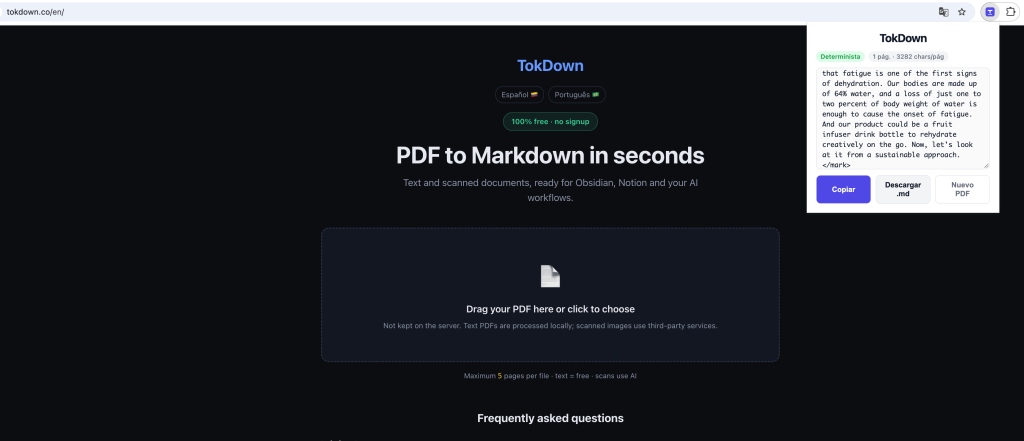
TokDown result in Chrome with the Deterministic label and Markdown ready to copy
Why build an extension if we already had the web app?
Some colleagues tried the web app and found it really useful for their work, but we ran into friction. While they were working in their browser, whether Chrome or Brave (for those who put security first), they had to open another tab, type in our URL, and then go back to the tab they were working in.
So we decided to build a Google Chrome extension, which is now available on the Chrome Web Store. It made our colleagues’ work much easier: they just click the extension icon in the browser toolbar, it opens, and with one click they pick the PDF they need to convert. And since Brave installs extensions from the same store, it works there too.
On privacy: TokDown doesn’t keep a copy of your file. PDFs with text are processed on our server without going through AI, and only scanned documents are sent to a third-party OCR service. Either way, the file is discarded as soon as the conversion is done.
Heads-up: the extension’s interface is in Spanish for now. An English version is on the way, and the web app is already fully in English.
How to convert a PDF to Markdown with TokDown
- Install the extension from the Chrome Web Store, or go to tokdown.co.
- If your PDF is longer than 5 pages, pull out the pages you need first: open it in Chrome, go to Print, choose “Save as PDF”, then under “Pages” pick Custom and enter just the range you want.
- Click the TokDown icon and choose your PDF, or drag it into the extension window.
- Copy the Markdown or download the .md file.
- Paste it into Claude, Notion or Obsidian.
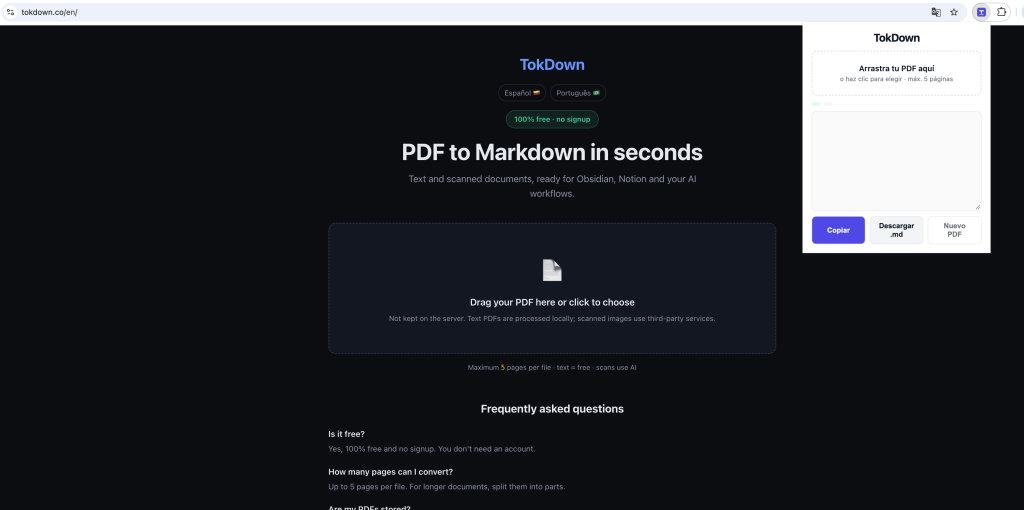
TokDown extension open in Chrome, selecting a PDF to convert to Markdown
What it doesn’t do (yet)
- For now, it converts up to 5 pages per file. It’s a temporary limit: OCR costs us money and, since TokDown is free, we’re keeping it this way while we improve it. If your document is longer, split it like in step 2.
- Scanned documents go through a third party. If your PDF is a scanned image and the document is confidential, keep that in mind.
Takeaways
- If you only need a piece of a PDF, don’t pay an AI to read the whole thing.
- If your PDF already has text, you don’t need AI to get it out.
- Markdown is the format that travels best between Claude, Notion and Obsidian.
We’re proud to have launched TokDown on Product Hunt, and we hope you find it useful and show it some love over there. That’s why we wrote this: so you can see why it was born and how it can help you too. We built it with love for the whole community, and what comes next is making it better, starting with that page limit. And if something breaks, we want to hear about that too.
Made with love by Carlos Correa and team. Enjoy tokdown.co or the extension on the Chrome Web Store.